a. Define the Scope
The first, and most important, step in any project is defining the scope of the project. What is it you are supposed to accomplish by managing this project? What is the project objective? Equally important is defining what is not included in the scope of your project. If you don't get enough definition from your boss, clarify the scope yourself and send it back upstairs for confirmation.
b. Determine Available Resources
what people, equipment, and money will you have available to you to achieve the project objectives? As a project manager, you usually will not have direct control of these resources, but will have to manage them through matrix management. Find out how easy or difficult that will be to do.
c. Check the Timeline
When does the project have to be completed? As you develop your project plan you may have some flexibility in how you use time during the project, but deadlines usually are fixed. If you decide to use overtime hours to meet the schedule, you must weigh that against the limitations of your budget.
d. Assemble Your Project Team
Get the people on your team together and start a dialog. They are the technical experts. That's why their functional supervisor assigned them to the project. Your job is to manage the team.
e. List the Big Steps
What are the major pieces of the project? If you don't know, start by asking your team. It is a good idea to list the steps in chronological order but don't obsess about it; you can always change the order later.
f. List the Smaller Steps
List the smaller steps in each of the larger steps. Again, it usually helps you remember all the steps if you list them in chronological order. How many levels deep you go of more and more detailed steps depends on the size and complexity of your project.
g. Develop a Preliminary Plan
Assemble all your steps into a plan. What happens first? What is the next step? Which steps can go on at the same time with different resources? Who is going to do each step? How long will it take? There are many excellent software packages available that can automate a lot of this detail for you. Ask others in similar positions what they use.
h. Create Your Baseline Plan
Get feedback on your preliminary plan from your team and from any other stakeholders. Adjust your timelines and work schedules to fit the project into the available time. Make any necessary adjustments to the preliminary plan to produce a baseline plan.
i. Request Project Adjustments
There is almost never enough time, money or talent assigned to a project. Your job is to do more with the limited resources than people expect. However, there are often limits placed on a project that are simply unrealistic. You need to make your case and present it to your boss and request these unrealistic limits be changed. Ask for the changes at the beginning of the project. Don't wait until it's in trouble to ask for the changes you need.
j. Work Your Plan, But Don't Die For It
Making the plan is important, but the plan can be changed. You have a plan for driving to work every morning. If one intersection is blocked by an accident, you change your plan and go a different way. Do the same with your project plans. Change them as needed, but always keep the scope and resources in mind.
k. Monitor Your Team's Progress
You will make little progress at the beginning of the project, but start then to monitor what everyone is doing anyway. That will make it easier to catch issues before they become problems.
l. Document Everything
Keep records. Every time you change from your baseline plan, write down what the change was and why it was necessary. Every time a new requirement is added to the project write down where the requirement came from and how the timeline or budget was adjusted because of it. You can't remember everything, so write them down so you'll be able to look them up at the end-of-project review and learn from them.
m. Keep Everyone Informed
Keep all the project stakeholders informed of progress all along. Let them know of your success as you complete each milestone, but also inform them of problems as soon as they come up. Also keep you team informed. If changes are being considered, tell the team about them as far ahead as you can. Make sure everyone on the team is aware of what everyone else is doing.
Wednesday, August 27, 2008

What is Normalization?
Normalization is the process of efficiently organizing data in a database. There are two goals of the normalization process: eliminating redundant data (for example, storing the same data in more than one table) and ensuring data dependencies make sense (only storing related data in a table). Both of these are worthy goals as they reduce the amount of space a database consumes and ensure that data is logically stored.
The database community has developed a series of guidelines for ensuring that databases are normalized. These are referred to as normal forms and are numbered from one (the lowest form of normalization, referred to as first normal form or 1NF) through five (fifth normal form or 5NF). In practical applications, you'll often see 1NF, 2NF, and 3NF along with the occasional 4NF. Fifth normal form is very rarely seen.
First Normal Form (1NF)
First normal form (1NF) sets the very basic rules for an organized database:
• Eliminate duplicative columns from the same table.
• Create separate tables for each group of related data and identify each row with a unique column or set of columns (the primary key).
Second Normal Form (2NF)
Second normal form (2NF) further addresses the concept of removing duplicative data:
• Meet all the requirements of the first normal form.
• Remove subsets of data that apply to multiple rows of a table and place them in separate tables.
• Create relationships between these new tables and their predecessors through the use of foreign keys.
Third Normal Form (3NF)
Third normal form (3NF) goes one large step further:
• Meet all the requirements of the second normal form.
• Remove columns that are not dependent upon the primary key.
Fourth Normal Form (4NF)
Finally, fourth normal form (4NF) has one additional requirement:
• Meet all the requirements of the third normal form.
• A relation is in 4NF if it has no multi-valued dependencies.
Remember, these normalization guidelines are cumulative. For a database to be in 2NF, it must first fulfill all the criteria of a 1NF database.
The database community has developed a series of guidelines for ensuring that databases are normalized. These are referred to as normal forms and are numbered from one (the lowest form of normalization, referred to as first normal form or 1NF) through five (fifth normal form or 5NF). In practical applications, you'll often see 1NF, 2NF, and 3NF along with the occasional 4NF. Fifth normal form is very rarely seen.
First Normal Form (1NF)
First normal form (1NF) sets the very basic rules for an organized database:
• Eliminate duplicative columns from the same table.
• Create separate tables for each group of related data and identify each row with a unique column or set of columns (the primary key).
Second Normal Form (2NF)
Second normal form (2NF) further addresses the concept of removing duplicative data:
• Meet all the requirements of the first normal form.
• Remove subsets of data that apply to multiple rows of a table and place them in separate tables.
• Create relationships between these new tables and their predecessors through the use of foreign keys.
Third Normal Form (3NF)
Third normal form (3NF) goes one large step further:
• Meet all the requirements of the second normal form.
• Remove columns that are not dependent upon the primary key.
Fourth Normal Form (4NF)
Finally, fourth normal form (4NF) has one additional requirement:
• Meet all the requirements of the third normal form.
• A relation is in 4NF if it has no multi-valued dependencies.
Remember, these normalization guidelines are cumulative. For a database to be in 2NF, it must first fulfill all the criteria of a 1NF database.
Define SQL Server Stored Procedures?
Stored procedures are precompiled database queries that improve the security, efficiency and usability of database client/server applications. Developers specify a stored procedure in terms of input and output variables. They then compile the code on the database platform and make it available to application developers for use in other environments, such as web applications. All of the major database platforms, including Oracle, SQL Server and MySQL support stored procedures. The major benefits of this technology are the substantial performance gains from precompiled execution, the reduction of client/server traffic, development efficiency gains from code reuse and abstraction and the security controls inherent in granting users permissions on specific stored procedures instead of the underlying database tables.
Microsoft SQL Server provides the stored procedure mechanism to simplify the database development process by grouping Transact-SQL statements into manageable blocks.
Benefits of Stored Procedures
Why should you use stored procedures? Let's take a look at the key benefits of this technology:
• Precompiled execution. SQL Server compiles each stored procedure once and then reutilizes the execution plan. This results in tremendous performance boosts when stored procedures are called repeatedly.
• Reduced client/server traffic. If network bandwidth is a concern in your environment, you'll be happy to learn that stored procedures can reduce long SQL queries to a single line that is transmitted over the wire.
• Efficient reuse of code and programming abstraction. Stored procedures can be used by multiple users and client programs. If you utilize them in a planned manner, you'll find the development cycle takes less time.
• Enhanced security controls. You can grant users permission to execute a stored procedure independently of underlying table permissions.
Structure
Stored procedures are extremely similar to the constructs seen in other programming languages. They accept data in the form of input parameters that are specified at execution time. These input parameters (if implemented) are utilized in the execution of a series of statements that produce some result. This result is returned to the calling environment through the use of a recordset, output parameters and a return code. That may sound like a mouthful, but you'll find that stored procedures are actually quite simple.
Microsoft SQL Server provides the stored procedure mechanism to simplify the database development process by grouping Transact-SQL statements into manageable blocks.
Benefits of Stored Procedures
Why should you use stored procedures? Let's take a look at the key benefits of this technology:
• Precompiled execution. SQL Server compiles each stored procedure once and then reutilizes the execution plan. This results in tremendous performance boosts when stored procedures are called repeatedly.
• Reduced client/server traffic. If network bandwidth is a concern in your environment, you'll be happy to learn that stored procedures can reduce long SQL queries to a single line that is transmitted over the wire.
• Efficient reuse of code and programming abstraction. Stored procedures can be used by multiple users and client programs. If you utilize them in a planned manner, you'll find the development cycle takes less time.
• Enhanced security controls. You can grant users permission to execute a stored procedure independently of underlying table permissions.
Structure
Stored procedures are extremely similar to the constructs seen in other programming languages. They accept data in the form of input parameters that are specified at execution time. These input parameters (if implemented) are utilized in the execution of a series of statements that produce some result. This result is returned to the calling environment through the use of a recordset, output parameters and a return code. That may sound like a mouthful, but you'll find that stored procedures are actually quite simple.
Definition Of SQL Server?
SQL Server is a relational database developed and sold by Microsoft. Originally bought from Sybase, Microsoft have released versions 6, 6.5, 7, 2000 and 2005.
SQL Server uses an enhanced version of SQL called T-SQL.
SQL Server uses an enhanced version of SQL called T-SQL.
Definition of SQL?
SQL, short for Structured Query Language is a simple programming language used for accessing and managing data in relational databases such as SQL Server.
SQL uses simple commands like select, insert, update and delete to manipulate rows of data.
SQL uses simple commands like select, insert, update and delete to manipulate rows of data.
Definition of Database?
A database is an application that manages data and allows fast storage and retrieval of that data.
There are different types of database but the most popular is a relational database that stores data in tables where each row in the table holds the same sort of information. In the early 1970s, Ted Codd, an IBM researcher devised 12 laws of normalization. These apply to how the data is stored and relations between different tables.
SQL is a simplistic programming language that is used in relational databases.
Oracle and SQL Server are popular commercial relational databases. MySQL is a very popular Open Source relational database.
There are different types of database but the most popular is a relational database that stores data in tables where each row in the table holds the same sort of information. In the early 1970s, Ted Codd, an IBM researcher devised 12 laws of normalization. These apply to how the data is stored and relations between different tables.
SQL is a simplistic programming language that is used in relational databases.
Oracle and SQL Server are popular commercial relational databases. MySQL is a very popular Open Source relational database.
Definition of OOP?
Object Oriented Programming (OOP) is a method of developing software that models the real world using objects. For example a driving simulation might have road objects, vehicle objects and possibly human objects.
An object is a self contained item of data that can only be accessed or changed in a controlled way. This prevents side effects- a common problem in procedural (non object ) code where data is globally accessible. Objects can receive or send messages to other objects by calling their methods.
Objects can be defined in terms of existing objects- this is known as inheritance. For an indepth look at OOP
An object is a self contained item of data that can only be accessed or changed in a controlled way. This prevents side effects- a common problem in procedural (non object ) code where data is globally accessible. Objects can receive or send messages to other objects by calling their methods.
Objects can be defined in terms of existing objects- this is known as inheritance. For an indepth look at OOP
Definition of Classes
A class is a type definition of an Object Oriented Programming object in the C++ and C# languages.
It is only a definition, until an instance of this class, an actual object is created, it cannot be used.
It is only a definition, until an instance of this class, an actual object is created, it cannot be used.
What is an API?
All Operating Systems provide a way for applications to use their system resources by using an Application Programming Interface or API. This is usually defined by an extensive list of functions and classes and variables
It's not just Operating Systems that provide APIs. Every programming library (and there are thousands available, both commercial or free) has an API. It's the job of a programmer to read and understand APIs so that he/she can make the best use of them.
It's not just Operating Systems that provide APIs. Every programming library (and there are thousands available, both commercial or free) has an API. It's the job of a programmer to read and understand APIs so that he/she can make the best use of them.
Define a Framework ?
A framework is a collection of classes and applications, libraries of SDKs and APIs to help the different components all work together.
Define .Net FrameWork ?
The .NET framework is part of Windows and provides a controlled environment for developing and running applications. Programmers do not have to "reinvent the wheel" as the framework provides a rich library of APIs that applications can use. This library includes functions for GUI, accessing databases, communicating across networks and much more.
It also supports many different programming languages including C++ and C#. There is less of a need to choose a particular programming language because of the features it offers.
It also supports many different programming languages including C++ and C#. There is less of a need to choose a particular programming language because of the features it offers.
Tuesday, August 5, 2008
Internet Top 20 Countries

Friday, August 1, 2008
Firefox Mail From Lets You Pick A Webmail Service
Several posts have made the round in the last weeks that explained how a specific webmail service could be selected as the default client when the user would click on a mailto link on a website. One article that can be seen as an example would be my How To Make Gmail The Default Mail Client article that I wrote last week.
That’s fine if you use Gmail, or another mail client as your primary mail client and practically no other. But what if you have accounts at Gmail, Yahoo Mail and AOL Mail? That’s where Mail From steps in. The Firefox add-on provides a way to select the mail client that should be used to send the mail from.
Mail From currently supports Gmail, Yahoo Mail, AOL Mail and the default mail client but the author has plans and offers a forum to suggest additional mail clients that should be added to the Firefox add-on.
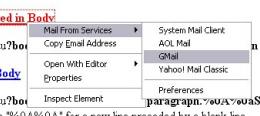
A right-click and the selection of the Mail From Services entry displays the currently available webmail services that can be picked. It is possible to remove any unnecessary services in the options of the add-on.
Users need an account at Mozilla.org to download and install the add-on because it is currently in the sandbox.
Microsoft Windows Malicious Software Removal Tool
A new version of the Microsoft Windows Malicious Software Removal Tool has been released as well yesterday. The new version is able to remove infections by specific prevalent malicious software. It´s able to detect 64 infections, that´s three more than the previous version. The three new infections that are detected are Locksky, Reatlle and Valla according to the german newsmag pcwelt.de.
The Microsoft Windows Malicious Software Removal Tool checks Windows XP, Windows 2000, and Windows Server 2003 computers for and helps remove infections by specific, prevalent malicious software—including Blaster, Sasser, and Mydoom. When the detection and removal process is complete, the tool displays a report describing the outcome, including which, if any, malicious software was detected and removed. The tool creates a log file named mrt.log in the %WINDIR%\debug folder.
The Microsoft Windows Malicious Software Removal Tool checks Windows XP, Windows 2000, and Windows Server 2003 computers for and helps remove infections by specific, prevalent malicious software—including Blaster, Sasser, and Mydoom. When the detection and removal process is complete, the tool displays a report describing the outcome, including which, if any, malicious software was detected and removed. The tool creates a log file named mrt.log in the %WINDIR%\debug folder.
Subscribe to:
Posts (Atom)
