.NET Framework General Reference
Capitalization Styles
Use the following three conventions for capitalizing identifiers.
Pascal case
The first letter in the identifier and the first letter of each subsequent concatenated word are capitalized. You can use Pascal case for identifiers of three or more characters. For example:
Copy Code
BackColor
Camel case
The first letter of an identifier is lowercase and the first letter of each subsequent concatenated word is capitalized. For example:
Copy Code
backColor
Uppercase
All letters in the identifier are capitalized. Use this convention only for identifiers that consist of two or fewer letters. For example:
Copy Code
System.IO
System.Web.UI
You might also have to capitalize identifiers to maintain compatibility with existing, unmanaged symbol schemes, where all uppercase characters are often used for enumerations and constant values. In general, these symbols should not be visible outside of the assembly that uses them.
The following table summarizes the capitalization rules and provides examples for the different types of identifiers.
Wednesday, October 22, 2008

Understanding .NET Framework at a glance
Introduction
In this article we are going to look at Microsoft .NET Framework. This is the newly established software development environment which helps developers to develop applications quickly and gives optimum, efficient, scalable, performance oriented applications in different languages like Visual Basic .NET, C#, ASP .NET, and Jscript .NET etc...
Overview of the .NET Framework
The .NET Framework is a new computing platform that simplifies application development in the highly distributed environment of the Internet.
Services
NET Framework provides the following services:
* Tools for developing software applications ,
* run-time environments for software application to execute,
* server infrastructure,
* value added intelligent software which helps developers to do less coding and work efficiently,
The .Net Framework will enable developers to develop applications for various devices and platforms like windows application web applications windows services and web services.
Objectives
The .NET Framework is designed to fulfill the following objectives:
* A consistent object-oriented programming environment, where object code can be stored and executed locally, executed locally but Internet-distributed, or executed remotely.
* A code-execution environment that minimizes software deployment and versioning conflicts.
* A code-execution environment that guarantees safe execution of code, including code created by an unknown or semi-trusted third party.
* A code-execution environment that eliminates the performance problems of scripted or interpreted environments.
* Developers can experience consistency across widely varying types of applications, such as Windows-based applications and Web-based applications.
* Build all communication on industry standards to ensure that code based on the .NET Framework can integrate with any other code.
Understanding the .NET Framework Architecture
The .NET Framework has two components: the .NET Framework class library and the common language runtime.
The .NET Framework class library facilitates types (CTS) that are common to all .NET languages.
The common language runtime consists of (class loader) that load the IL code of a program into the runtime, which compiles the IL code into native code, and executes and manage the code to enforce security and type safety, and provide thread support.
.NET Framework Architecture has languages at the top such as VB .NET C#, VJ#, VC++ .NET; developers can develop (using any of above languages) applications such as Windows Forms, Web Form, Windows Services and XML Web Services. Bottom two layers consist of .NET Framework class library and Common Language Runtime. This we are going to understand using this article.
Understanding the Role of .NET Framework
The .NET Framework has two main components: the common language runtime (CLR) and the .NET Framework class library. The common language runtime is the foundation of the .NET Framework. CLR act as an agent that manages code at execution time, providing core services such as memory management, thread management, and remoting, while also enforcing strict type safety and facilitates with code accuracy that ensure security and robustness. The concept of code management is a fundamental principle of the CLR. Code that targets the CLR is known as managed code, while code that does not target the CLR is known as unmanaged code.
The class library, is a integral component of the .NET Framework, consists of object-oriented collection of reusable classes (types) that we can use to develop applications ranging from traditional command-line or any graphical user interface (GUI) applications such as Windows Forms, ASP. NET Web Forms and Windows Services the newly invented XML Web services.
The European Computer Manufacturers Association (ECMA) standard has defines the Common Language Specification (CLS); this enforces that software development languages should be interoperable between them. The code written in a CLS should be compliant with the code written in another CLS-compliant language. Because the code supported by CLS-compliant language should be compiled into an intermediate language (IL) code. The CLR engine executes the IL code. This ensures interoperability between CLS-compliant languages. Microsoft .NET Framework supports Languages like Microsoft Visual Basic .NET, Microsoft Visual C#, Microsoft Visual C++ .NET, and Microsoft Visual J# .NET.
The language compilers generate an Intermediate Language code, called Microsoft Intermediate Language (MSIL), which makes programs written in the .NET languages interoperable across languages.
The ECMA standard, Common Language Infrastructure (CLI), defines the specifications for the infrastructure that the IL code needs for execution. The CLI provides a common type system (CTS) and services such as type safety, managed code execution and side by side execution.
Figure 1. ECMA Standards under Microsoft .NET Framework.
The .NET Framework provides the infrastructure and services. The CLI specifications. These include:
Common language runtime.
* The CLR includes the CLI,
* The CLR also provides the execution environment for .NET Applications.
Common type system.
* Provides the data types, values, object types. This helps developers to develop applications in different languages. Where .NET languages share CTS mean all the types used in applications shares the same types defined under CLI.
Type safety.
* .NET Framework performs operations on the values or objects for which .NET Framework requires each value or object has a type and which reference to the value or object type.
Managed code execution.
* .NET Framework manages the state of the object while executing the .NET Applications.
* .NET Framework automatically allocates memory and provides garbage collation mechanism to de-allocate memory.
Side-by-side execution.
* .NET Framework allows different version of the same application to run on the same machine by using assemblies of different versions.
* Assemblies consist of IL Code and Metadata. Where metadata determines the application dependencies. By this .NET Framework Runtime executes multiple version of assembly and solves the major problem of legacy development environment. That is the “DLL HELL”.
.NET Assembly
Figure 2 Side-by-side Execution.
Understanding .NET Framework CLR
The common language runtime facilitates the followings:
Run-time environment and
* CLR Compiles application into the runtime, compile the IL code into native code, execute the code
Run-time services.
* Memory management,
* Type safety,
* Enforces Security,
* Exception Management.
* Thread support
* Debugging support
Understanding Architecture of .NET Framework CLR
* Class loader, which loads classes into CLR.
* MSIL to native code compiles, this converts MSIL code into native code.
* Code manager, this manages the code during execution.
* Memory allocation and Garbage collector, this performs automatic memory management.
* Security engine, this enforces security restrictions as code level security folder level and machine level security using tools provided by Microsoft .NET and using .NET Framework setting under control panel.
* Type checker, which enforces strict type checking.
* Thread support, which provides multithreading support to applications.
* Exception manager, which provides a mechanism to handle the run-time exceptions handling.
* Debug engine, which allows developer to debug different types of applications.
* COM marshaler, which allows .NET applications to exchange data with COM applications.
* Base class library support, which provides the classes (types) that the applications need at run time.
Features of the Common Language Runtime
The CLR has the following Features
* Manages memory,
o Allocation of Memory
o De-Allocation of Memory (garbage collation)
* Thread execution support,
* Code execution,
* Code safety verification,
* Compilation.
o MSIL to Native Code.
* Code Security based on Trust (granted permission to execute code. Code level, Folder level, Machine level)
These features are intrinsic to the managed code that runs on the common language runtime.
Understanding CLR
To execute the program and gain all the benefits of managed execution environment we write code in a language which is supported by CLS that is .NET Framework. The language compiler compiles the source code into the MSIL code which consists of CPU- independent code and instructions which is platform independent. MSIL consists of the followings:
* Instructions that enables to perform arithmetic and logical operations
* Access memory directly.
* Control the flow of execution,
* Handles exceptions,
MSIL code can be compiling into CPU specific instructions before executing, for which the CLR requires information about the code which is nothing but metadata. Metadata describes the code and defines the types that the code contains as well referenced to other types which the code uses at run time.
An assembly consists of portable executable file. At the time of executing PE file the class loader loads the MSIL code and the metadata form the portable executable file into the run time memory.
Before the execution of PE file it passes the code to the native code compiler for compilation, IL to native code compilation is done by JIT compiler. For different CPU architecture and compilers for the IL code in to the native instructions.
Future of CLR
* Managed multithreading support and monitor the threads. Application domain contains one or more threads to execute.
* Manages interoperability with unmanaged code, and COM marshaling
* A structured exception handling mechanism,
* The infrastructure and managed execution process, memory management and garbage collection.
Architecture of CLR
* Base class library support supports all the base classes used for .net languages to support basic functionality
* COM Marshaler supports Marshaling of data between COM objects.
* Exception management supports handling Errors at runtime using try catch finally blocks.
* Security engine enforces security rules at runtime.
* Type checker checks for Type safe checks at runtime.
* Debug engine supports debugging at runtime.
* Code manger manages the Managed code at runtime.
* IL to native compiler compiles the MSIL code to the Native code which is machine independent
* Garbage collector supports the Memory management and supports Clearing unused memory at runtime.
* Class loader lodes the classes at runtime
Understanding JIT compiler
JIT compiler compiles is the integral part of CLR. the MSIL code to Native code and executes the batch of code Just in time which will be cached and next time when the code gets executed from cache in stud of compiling again.
JIT Execution process.
CLR class loader lodes MSIL code and metadata are loaded into memory; the code manager calls the entry point method which is WinMain or DLLMain method. The JIT compiler compiles the method to before its execution of the entry point method. The code manager places the objects in memory and controls the execution of the code. The garbage collector performs periodic checks on the managed heap to identify the objects which is not in use for the application.
At the time of program execution the type checker ensures that all objects and values, and the references of objects and values has its valid type. The type checker also makes sure that only valid operations are performed on the code other wise the exception will be thrown. The code is controlled by CLR at run time. CLR enforces security in following manner.
* To control and access the system recourses like hard disk
* To control and access the network connections
* To control and access the other hard ware resources.
Managed code Execution
Managed code execution is known as the process executed by the CLR which is as follows:
* CLR loads the MSIL & refers metadata,
* CLR executes the Native code,
* CLR provides automatic memory management.
* Managed execution also performs JIT compilations,
* Ensuring type safety,
* Enforcing security,
* Handling exceptions.
Managed Execution Process
Managed code is self-explanatory code which gives information to CLR for multiple runtime services in .NET Framework.
This information is stored in MSIL code in the form of metadata inside the PE file. Mata data information will describe the types that the code contains.
Managed data is allocated and released from memory automatically by garbage collection. Managed data can be accessible form managed code but managed code can be accessible from managed and unmanaged data.
Memory Management
Automatic memory management means no need to write code to allocate memory when objects are created or to release memory when objects are not required the application.
The process of automatic memory management involves the following tasks:
Allocating memory
When a process is initialized, the runtime reserves a contiguous address space without allocating any storage space for it. This reserved address space is called a managed heap. The managed heap keeps a pointer at the location where the next object will be located. When an application uses the new operator to create an object, the new operator checks whether the memory required by the object is available on the heap.
When the next object is created, the garbage collector allocates memory to the object on the managed heap, Allocating memory to the objects in a managed heap takes less time than allocating unmanaged memory. In unmanaged memory, the pointers to memory are maintained in linked-list data structures. Therefore, allocating memory requires navigating through the linked list, finding a large memory block to accommodate the
You can access objects in managed memory faster than objects in unmanaged memory because in managed memory allocation, objects are created contiguously in the managed address space.
Releasing Memory
The garbage collector periodically releases memory from the objects that are no longer required by the application.
Every application has a set of roots. Roots point to the storage location on the managed heap. Each root either refers to an object on the managed heap or is set to null. An application's roots consist of global and static object pointers, local variables, and reference object parameters on a thread stack. The JIT compiler and the run-time maintain the list of the application roots. The garbage collector uses this list to create a graph of objects on the managed heap that are reachable from the root list.
When the garbage collector starts running, it considers all the objects on the managed heap as garbage. The garbage collector navigates through the application root list, it identifies the objects that have corresponding references in the application root list and marks them as reachable. The garbage collector also considers such objects as reachable objects. The garbage collector considers all unreachable objects on the managed heap as garbage.
The garbage collector performs a collection process to free the memory occupied by the garbage objects. The garbage collector performs the memory copy function to compress the objects in the managed heap. The garbage collector updates the pointers in the application root list so that the application roots correctly point to the objects to which they were pointing earlier. The garbage collector uses a highly optimized mechanism to perform garbage collection. It divides the objects on the managed heap into three generations: 0, 1, and 2. Generation 0 contains recently created objects. The garbage collector first collects the unreachable objects in generation 0. Next, the garbage collector compacts memory and promotes the reachable objects to generation 1. The objects that survive the collection process are promoted to higher generations.
The garbage collector searches for unreachable objects in generations 1 and 2 only when the memory released by the collection process of generation 0 objects is insufficient to create the new object. The garbage collector manages memory for all managed objects created by the application. The garbage collection can explicitly release these system resources by providing the cleanup code in the Dispose method of the object. We need to explicitly call the Dispose method after you finish working with the object.
Implementing Finalizers
The finalization process allows an object to perform cleanup tasks automatically before garbage collection starts.
The Finalize method ensures that even if the client does not call the Dispose method explicitly, the resources used by the object are released from memory when the object is garbage collected. After the garbage collector identifies the object as garbage during garbage collection, it calls the Finalize method on the object before releasing memory. Finalizers are the methods that contain the cleanup code that is executed before the object is garbage collected. The process of executing cleanup code is called finalization. The Dispose and Finalize methods are called finalizers.
The Dispose method of an object should release all its resources in addition to the resources owned by its parent object by calling the Dispose method of the parent object.
We can execute the Dispose method in two ways.
* The user of the class can call the Dispose method on the object that is being disposed, or
* The Finalize method can call the Dispose method during the finalization process.
.NET Framework Tools
Assembly Linker - Al.exe Tool
Al tool can create an assembly or resource file with the manifest in a separate file out of modules.
Syntax: al [source] [options]
This tool allows us to create multi-file assembly outside .NET. A multi-file assembly is useful to combine modules developed under different .NET languages into a single application.
IL Assembler - Ilasm.exe Tool
When we compile managed code, the code is converted into MSIL code; this is CPU independent language which is converted to native code.
We can use Ilasm tool to generate a portable executable (PE) file from the MSIL code. The resulting executable file is performance optimized, where the Ilasm tool does not create intermediate object file
Syntax: Ilasm [source] filename [options]
We can specify multiple source files to produce a single PE file.
IL Disassembler - Ildasm.exe Tool
Ildasm tool is used to view PE file contains that is nothing but the MSIL code as a parameter and creates the text file that consists of managed code.
Code Access Security Policy Tool - Caspol.exe Tool
Caspol is nothing but Code Access Security Policy tool, which allows us to grant and modify permissions granted to code groups at the user-policy, machine-policy, and enterprise-policy levels. Etc...
Syntax: caspol [options]
.NET Framework Configuration Tool - Mscorcfg.msc
With this tool we can manage and configure assemblies in to the global assembly cache. And also manage the code access security along with remoting services.
This tool also creates code group policies at user level- policies, machine level-policies, and enterprise level policies to assign and remove the permissions on assemblies developed within .NET Framework.
In this article we are going to look at Microsoft .NET Framework. This is the newly established software development environment which helps developers to develop applications quickly and gives optimum, efficient, scalable, performance oriented applications in different languages like Visual Basic .NET, C#, ASP .NET, and Jscript .NET etc...
Overview of the .NET Framework
The .NET Framework is a new computing platform that simplifies application development in the highly distributed environment of the Internet.
Services
NET Framework provides the following services:
* Tools for developing software applications ,
* run-time environments for software application to execute,
* server infrastructure,
* value added intelligent software which helps developers to do less coding and work efficiently,
The .Net Framework will enable developers to develop applications for various devices and platforms like windows application web applications windows services and web services.
Objectives
The .NET Framework is designed to fulfill the following objectives:
* A consistent object-oriented programming environment, where object code can be stored and executed locally, executed locally but Internet-distributed, or executed remotely.
* A code-execution environment that minimizes software deployment and versioning conflicts.
* A code-execution environment that guarantees safe execution of code, including code created by an unknown or semi-trusted third party.
* A code-execution environment that eliminates the performance problems of scripted or interpreted environments.
* Developers can experience consistency across widely varying types of applications, such as Windows-based applications and Web-based applications.
* Build all communication on industry standards to ensure that code based on the .NET Framework can integrate with any other code.
Understanding the .NET Framework Architecture
The .NET Framework has two components: the .NET Framework class library and the common language runtime.
The .NET Framework class library facilitates types (CTS) that are common to all .NET languages.
The common language runtime consists of (class loader) that load the IL code of a program into the runtime, which compiles the IL code into native code, and executes and manage the code to enforce security and type safety, and provide thread support.
.NET Framework Architecture has languages at the top such as VB .NET C#, VJ#, VC++ .NET; developers can develop (using any of above languages) applications such as Windows Forms, Web Form, Windows Services and XML Web Services. Bottom two layers consist of .NET Framework class library and Common Language Runtime. This we are going to understand using this article.
Understanding the Role of .NET Framework
The .NET Framework has two main components: the common language runtime (CLR) and the .NET Framework class library. The common language runtime is the foundation of the .NET Framework. CLR act as an agent that manages code at execution time, providing core services such as memory management, thread management, and remoting, while also enforcing strict type safety and facilitates with code accuracy that ensure security and robustness. The concept of code management is a fundamental principle of the CLR. Code that targets the CLR is known as managed code, while code that does not target the CLR is known as unmanaged code.
The class library, is a integral component of the .NET Framework, consists of object-oriented collection of reusable classes (types) that we can use to develop applications ranging from traditional command-line or any graphical user interface (GUI) applications such as Windows Forms, ASP. NET Web Forms and Windows Services the newly invented XML Web services.
The European Computer Manufacturers Association (ECMA) standard has defines the Common Language Specification (CLS); this enforces that software development languages should be interoperable between them. The code written in a CLS should be compliant with the code written in another CLS-compliant language. Because the code supported by CLS-compliant language should be compiled into an intermediate language (IL) code. The CLR engine executes the IL code. This ensures interoperability between CLS-compliant languages. Microsoft .NET Framework supports Languages like Microsoft Visual Basic .NET, Microsoft Visual C#, Microsoft Visual C++ .NET, and Microsoft Visual J# .NET.
The language compilers generate an Intermediate Language code, called Microsoft Intermediate Language (MSIL), which makes programs written in the .NET languages interoperable across languages.
The ECMA standard, Common Language Infrastructure (CLI), defines the specifications for the infrastructure that the IL code needs for execution. The CLI provides a common type system (CTS) and services such as type safety, managed code execution and side by side execution.
Figure 1. ECMA Standards under Microsoft .NET Framework.
The .NET Framework provides the infrastructure and services. The CLI specifications. These include:
Common language runtime.
* The CLR includes the CLI,
* The CLR also provides the execution environment for .NET Applications.
Common type system.
* Provides the data types, values, object types. This helps developers to develop applications in different languages. Where .NET languages share CTS mean all the types used in applications shares the same types defined under CLI.
Type safety.
* .NET Framework performs operations on the values or objects for which .NET Framework requires each value or object has a type and which reference to the value or object type.
Managed code execution.
* .NET Framework manages the state of the object while executing the .NET Applications.
* .NET Framework automatically allocates memory and provides garbage collation mechanism to de-allocate memory.
Side-by-side execution.
* .NET Framework allows different version of the same application to run on the same machine by using assemblies of different versions.
* Assemblies consist of IL Code and Metadata. Where metadata determines the application dependencies. By this .NET Framework Runtime executes multiple version of assembly and solves the major problem of legacy development environment. That is the “DLL HELL”.
.NET Assembly
Figure 2 Side-by-side Execution.
Understanding .NET Framework CLR
The common language runtime facilitates the followings:
Run-time environment and
* CLR Compiles application into the runtime, compile the IL code into native code, execute the code
Run-time services.
* Memory management,
* Type safety,
* Enforces Security,
* Exception Management.
* Thread support
* Debugging support
Understanding Architecture of .NET Framework CLR
* Class loader, which loads classes into CLR.
* MSIL to native code compiles, this converts MSIL code into native code.
* Code manager, this manages the code during execution.
* Memory allocation and Garbage collector, this performs automatic memory management.
* Security engine, this enforces security restrictions as code level security folder level and machine level security using tools provided by Microsoft .NET and using .NET Framework setting under control panel.
* Type checker, which enforces strict type checking.
* Thread support, which provides multithreading support to applications.
* Exception manager, which provides a mechanism to handle the run-time exceptions handling.
* Debug engine, which allows developer to debug different types of applications.
* COM marshaler, which allows .NET applications to exchange data with COM applications.
* Base class library support, which provides the classes (types) that the applications need at run time.
Features of the Common Language Runtime
The CLR has the following Features
* Manages memory,
o Allocation of Memory
o De-Allocation of Memory (garbage collation)
* Thread execution support,
* Code execution,
* Code safety verification,
* Compilation.
o MSIL to Native Code.
* Code Security based on Trust (granted permission to execute code. Code level, Folder level, Machine level)
These features are intrinsic to the managed code that runs on the common language runtime.
Understanding CLR
To execute the program and gain all the benefits of managed execution environment we write code in a language which is supported by CLS that is .NET Framework. The language compiler compiles the source code into the MSIL code which consists of CPU- independent code and instructions which is platform independent. MSIL consists of the followings:
* Instructions that enables to perform arithmetic and logical operations
* Access memory directly.
* Control the flow of execution,
* Handles exceptions,
MSIL code can be compiling into CPU specific instructions before executing, for which the CLR requires information about the code which is nothing but metadata. Metadata describes the code and defines the types that the code contains as well referenced to other types which the code uses at run time.
An assembly consists of portable executable file. At the time of executing PE file the class loader loads the MSIL code and the metadata form the portable executable file into the run time memory.
Before the execution of PE file it passes the code to the native code compiler for compilation, IL to native code compilation is done by JIT compiler. For different CPU architecture and compilers for the IL code in to the native instructions.
Future of CLR
* Managed multithreading support and monitor the threads. Application domain contains one or more threads to execute.
* Manages interoperability with unmanaged code, and COM marshaling
* A structured exception handling mechanism,
* The infrastructure and managed execution process, memory management and garbage collection.
Architecture of CLR
* Base class library support supports all the base classes used for .net languages to support basic functionality
* COM Marshaler supports Marshaling of data between COM objects.
* Exception management supports handling Errors at runtime using try catch finally blocks.
* Security engine enforces security rules at runtime.
* Type checker checks for Type safe checks at runtime.
* Debug engine supports debugging at runtime.
* Code manger manages the Managed code at runtime.
* IL to native compiler compiles the MSIL code to the Native code which is machine independent
* Garbage collector supports the Memory management and supports Clearing unused memory at runtime.
* Class loader lodes the classes at runtime
Understanding JIT compiler
JIT compiler compiles is the integral part of CLR. the MSIL code to Native code and executes the batch of code Just in time which will be cached and next time when the code gets executed from cache in stud of compiling again.
JIT Execution process.
CLR class loader lodes MSIL code and metadata are loaded into memory; the code manager calls the entry point method which is WinMain or DLLMain method. The JIT compiler compiles the method to before its execution of the entry point method. The code manager places the objects in memory and controls the execution of the code. The garbage collector performs periodic checks on the managed heap to identify the objects which is not in use for the application.
At the time of program execution the type checker ensures that all objects and values, and the references of objects and values has its valid type. The type checker also makes sure that only valid operations are performed on the code other wise the exception will be thrown. The code is controlled by CLR at run time. CLR enforces security in following manner.
* To control and access the system recourses like hard disk
* To control and access the network connections
* To control and access the other hard ware resources.
Managed code Execution
Managed code execution is known as the process executed by the CLR which is as follows:
* CLR loads the MSIL & refers metadata,
* CLR executes the Native code,
* CLR provides automatic memory management.
* Managed execution also performs JIT compilations,
* Ensuring type safety,
* Enforcing security,
* Handling exceptions.
Managed Execution Process
Managed code is self-explanatory code which gives information to CLR for multiple runtime services in .NET Framework.
This information is stored in MSIL code in the form of metadata inside the PE file. Mata data information will describe the types that the code contains.
Managed data is allocated and released from memory automatically by garbage collection. Managed data can be accessible form managed code but managed code can be accessible from managed and unmanaged data.
Memory Management
Automatic memory management means no need to write code to allocate memory when objects are created or to release memory when objects are not required the application.
The process of automatic memory management involves the following tasks:
Allocating memory
When a process is initialized, the runtime reserves a contiguous address space without allocating any storage space for it. This reserved address space is called a managed heap. The managed heap keeps a pointer at the location where the next object will be located. When an application uses the new operator to create an object, the new operator checks whether the memory required by the object is available on the heap.
When the next object is created, the garbage collector allocates memory to the object on the managed heap, Allocating memory to the objects in a managed heap takes less time than allocating unmanaged memory. In unmanaged memory, the pointers to memory are maintained in linked-list data structures. Therefore, allocating memory requires navigating through the linked list, finding a large memory block to accommodate the
You can access objects in managed memory faster than objects in unmanaged memory because in managed memory allocation, objects are created contiguously in the managed address space.
Releasing Memory
The garbage collector periodically releases memory from the objects that are no longer required by the application.
Every application has a set of roots. Roots point to the storage location on the managed heap. Each root either refers to an object on the managed heap or is set to null. An application's roots consist of global and static object pointers, local variables, and reference object parameters on a thread stack. The JIT compiler and the run-time maintain the list of the application roots. The garbage collector uses this list to create a graph of objects on the managed heap that are reachable from the root list.
When the garbage collector starts running, it considers all the objects on the managed heap as garbage. The garbage collector navigates through the application root list, it identifies the objects that have corresponding references in the application root list and marks them as reachable. The garbage collector also considers such objects as reachable objects. The garbage collector considers all unreachable objects on the managed heap as garbage.
The garbage collector performs a collection process to free the memory occupied by the garbage objects. The garbage collector performs the memory copy function to compress the objects in the managed heap. The garbage collector updates the pointers in the application root list so that the application roots correctly point to the objects to which they were pointing earlier. The garbage collector uses a highly optimized mechanism to perform garbage collection. It divides the objects on the managed heap into three generations: 0, 1, and 2. Generation 0 contains recently created objects. The garbage collector first collects the unreachable objects in generation 0. Next, the garbage collector compacts memory and promotes the reachable objects to generation 1. The objects that survive the collection process are promoted to higher generations.
The garbage collector searches for unreachable objects in generations 1 and 2 only when the memory released by the collection process of generation 0 objects is insufficient to create the new object. The garbage collector manages memory for all managed objects created by the application. The garbage collection can explicitly release these system resources by providing the cleanup code in the Dispose method of the object. We need to explicitly call the Dispose method after you finish working with the object.
Implementing Finalizers
The finalization process allows an object to perform cleanup tasks automatically before garbage collection starts.
The Finalize method ensures that even if the client does not call the Dispose method explicitly, the resources used by the object are released from memory when the object is garbage collected. After the garbage collector identifies the object as garbage during garbage collection, it calls the Finalize method on the object before releasing memory. Finalizers are the methods that contain the cleanup code that is executed before the object is garbage collected. The process of executing cleanup code is called finalization. The Dispose and Finalize methods are called finalizers.
The Dispose method of an object should release all its resources in addition to the resources owned by its parent object by calling the Dispose method of the parent object.
We can execute the Dispose method in two ways.
* The user of the class can call the Dispose method on the object that is being disposed, or
* The Finalize method can call the Dispose method during the finalization process.
.NET Framework Tools
Assembly Linker - Al.exe Tool
Al tool can create an assembly or resource file with the manifest in a separate file out of modules.
Syntax: al [source] [options]
This tool allows us to create multi-file assembly outside .NET. A multi-file assembly is useful to combine modules developed under different .NET languages into a single application.
IL Assembler - Ilasm.exe Tool
When we compile managed code, the code is converted into MSIL code; this is CPU independent language which is converted to native code.
We can use Ilasm tool to generate a portable executable (PE) file from the MSIL code. The resulting executable file is performance optimized, where the Ilasm tool does not create intermediate object file
Syntax: Ilasm [source] filename [options]
We can specify multiple source files to produce a single PE file.
IL Disassembler - Ildasm.exe Tool
Ildasm tool is used to view PE file contains that is nothing but the MSIL code as a parameter and creates the text file that consists of managed code.
Code Access Security Policy Tool - Caspol.exe Tool
Caspol is nothing but Code Access Security Policy tool, which allows us to grant and modify permissions granted to code groups at the user-policy, machine-policy, and enterprise-policy levels. Etc...
Syntax: caspol [options]
.NET Framework Configuration Tool - Mscorcfg.msc
With this tool we can manage and configure assemblies in to the global assembly cache. And also manage the code access security along with remoting services.
This tool also creates code group policies at user level- policies, machine level-policies, and enterprise level policies to assign and remove the permissions on assemblies developed within .NET Framework.
Wednesday, August 27, 2008
How to manage a project ?
a. Define the Scope
The first, and most important, step in any project is defining the scope of the project. What is it you are supposed to accomplish by managing this project? What is the project objective? Equally important is defining what is not included in the scope of your project. If you don't get enough definition from your boss, clarify the scope yourself and send it back upstairs for confirmation.
b. Determine Available Resources
what people, equipment, and money will you have available to you to achieve the project objectives? As a project manager, you usually will not have direct control of these resources, but will have to manage them through matrix management. Find out how easy or difficult that will be to do.
c. Check the Timeline
When does the project have to be completed? As you develop your project plan you may have some flexibility in how you use time during the project, but deadlines usually are fixed. If you decide to use overtime hours to meet the schedule, you must weigh that against the limitations of your budget.
d. Assemble Your Project Team
Get the people on your team together and start a dialog. They are the technical experts. That's why their functional supervisor assigned them to the project. Your job is to manage the team.
e. List the Big Steps
What are the major pieces of the project? If you don't know, start by asking your team. It is a good idea to list the steps in chronological order but don't obsess about it; you can always change the order later.
f. List the Smaller Steps
List the smaller steps in each of the larger steps. Again, it usually helps you remember all the steps if you list them in chronological order. How many levels deep you go of more and more detailed steps depends on the size and complexity of your project.
g. Develop a Preliminary Plan
Assemble all your steps into a plan. What happens first? What is the next step? Which steps can go on at the same time with different resources? Who is going to do each step? How long will it take? There are many excellent software packages available that can automate a lot of this detail for you. Ask others in similar positions what they use.
h. Create Your Baseline Plan
Get feedback on your preliminary plan from your team and from any other stakeholders. Adjust your timelines and work schedules to fit the project into the available time. Make any necessary adjustments to the preliminary plan to produce a baseline plan.
i. Request Project Adjustments
There is almost never enough time, money or talent assigned to a project. Your job is to do more with the limited resources than people expect. However, there are often limits placed on a project that are simply unrealistic. You need to make your case and present it to your boss and request these unrealistic limits be changed. Ask for the changes at the beginning of the project. Don't wait until it's in trouble to ask for the changes you need.
j. Work Your Plan, But Don't Die For It
Making the plan is important, but the plan can be changed. You have a plan for driving to work every morning. If one intersection is blocked by an accident, you change your plan and go a different way. Do the same with your project plans. Change them as needed, but always keep the scope and resources in mind.
k. Monitor Your Team's Progress
You will make little progress at the beginning of the project, but start then to monitor what everyone is doing anyway. That will make it easier to catch issues before they become problems.
l. Document Everything
Keep records. Every time you change from your baseline plan, write down what the change was and why it was necessary. Every time a new requirement is added to the project write down where the requirement came from and how the timeline or budget was adjusted because of it. You can't remember everything, so write them down so you'll be able to look them up at the end-of-project review and learn from them.
m. Keep Everyone Informed
Keep all the project stakeholders informed of progress all along. Let them know of your success as you complete each milestone, but also inform them of problems as soon as they come up. Also keep you team informed. If changes are being considered, tell the team about them as far ahead as you can. Make sure everyone on the team is aware of what everyone else is doing.
The first, and most important, step in any project is defining the scope of the project. What is it you are supposed to accomplish by managing this project? What is the project objective? Equally important is defining what is not included in the scope of your project. If you don't get enough definition from your boss, clarify the scope yourself and send it back upstairs for confirmation.
b. Determine Available Resources
what people, equipment, and money will you have available to you to achieve the project objectives? As a project manager, you usually will not have direct control of these resources, but will have to manage them through matrix management. Find out how easy or difficult that will be to do.
c. Check the Timeline
When does the project have to be completed? As you develop your project plan you may have some flexibility in how you use time during the project, but deadlines usually are fixed. If you decide to use overtime hours to meet the schedule, you must weigh that against the limitations of your budget.
d. Assemble Your Project Team
Get the people on your team together and start a dialog. They are the technical experts. That's why their functional supervisor assigned them to the project. Your job is to manage the team.
e. List the Big Steps
What are the major pieces of the project? If you don't know, start by asking your team. It is a good idea to list the steps in chronological order but don't obsess about it; you can always change the order later.
f. List the Smaller Steps
List the smaller steps in each of the larger steps. Again, it usually helps you remember all the steps if you list them in chronological order. How many levels deep you go of more and more detailed steps depends on the size and complexity of your project.
g. Develop a Preliminary Plan
Assemble all your steps into a plan. What happens first? What is the next step? Which steps can go on at the same time with different resources? Who is going to do each step? How long will it take? There are many excellent software packages available that can automate a lot of this detail for you. Ask others in similar positions what they use.
h. Create Your Baseline Plan
Get feedback on your preliminary plan from your team and from any other stakeholders. Adjust your timelines and work schedules to fit the project into the available time. Make any necessary adjustments to the preliminary plan to produce a baseline plan.
i. Request Project Adjustments
There is almost never enough time, money or talent assigned to a project. Your job is to do more with the limited resources than people expect. However, there are often limits placed on a project that are simply unrealistic. You need to make your case and present it to your boss and request these unrealistic limits be changed. Ask for the changes at the beginning of the project. Don't wait until it's in trouble to ask for the changes you need.
j. Work Your Plan, But Don't Die For It
Making the plan is important, but the plan can be changed. You have a plan for driving to work every morning. If one intersection is blocked by an accident, you change your plan and go a different way. Do the same with your project plans. Change them as needed, but always keep the scope and resources in mind.
k. Monitor Your Team's Progress
You will make little progress at the beginning of the project, but start then to monitor what everyone is doing anyway. That will make it easier to catch issues before they become problems.
l. Document Everything
Keep records. Every time you change from your baseline plan, write down what the change was and why it was necessary. Every time a new requirement is added to the project write down where the requirement came from and how the timeline or budget was adjusted because of it. You can't remember everything, so write them down so you'll be able to look them up at the end-of-project review and learn from them.
m. Keep Everyone Informed
Keep all the project stakeholders informed of progress all along. Let them know of your success as you complete each milestone, but also inform them of problems as soon as they come up. Also keep you team informed. If changes are being considered, tell the team about them as far ahead as you can. Make sure everyone on the team is aware of what everyone else is doing.
What is Normalization?
Normalization is the process of efficiently organizing data in a database. There are two goals of the normalization process: eliminating redundant data (for example, storing the same data in more than one table) and ensuring data dependencies make sense (only storing related data in a table). Both of these are worthy goals as they reduce the amount of space a database consumes and ensure that data is logically stored.
The database community has developed a series of guidelines for ensuring that databases are normalized. These are referred to as normal forms and are numbered from one (the lowest form of normalization, referred to as first normal form or 1NF) through five (fifth normal form or 5NF). In practical applications, you'll often see 1NF, 2NF, and 3NF along with the occasional 4NF. Fifth normal form is very rarely seen.
First Normal Form (1NF)
First normal form (1NF) sets the very basic rules for an organized database:
• Eliminate duplicative columns from the same table.
• Create separate tables for each group of related data and identify each row with a unique column or set of columns (the primary key).
Second Normal Form (2NF)
Second normal form (2NF) further addresses the concept of removing duplicative data:
• Meet all the requirements of the first normal form.
• Remove subsets of data that apply to multiple rows of a table and place them in separate tables.
• Create relationships between these new tables and their predecessors through the use of foreign keys.
Third Normal Form (3NF)
Third normal form (3NF) goes one large step further:
• Meet all the requirements of the second normal form.
• Remove columns that are not dependent upon the primary key.
Fourth Normal Form (4NF)
Finally, fourth normal form (4NF) has one additional requirement:
• Meet all the requirements of the third normal form.
• A relation is in 4NF if it has no multi-valued dependencies.
Remember, these normalization guidelines are cumulative. For a database to be in 2NF, it must first fulfill all the criteria of a 1NF database.
The database community has developed a series of guidelines for ensuring that databases are normalized. These are referred to as normal forms and are numbered from one (the lowest form of normalization, referred to as first normal form or 1NF) through five (fifth normal form or 5NF). In practical applications, you'll often see 1NF, 2NF, and 3NF along with the occasional 4NF. Fifth normal form is very rarely seen.
First Normal Form (1NF)
First normal form (1NF) sets the very basic rules for an organized database:
• Eliminate duplicative columns from the same table.
• Create separate tables for each group of related data and identify each row with a unique column or set of columns (the primary key).
Second Normal Form (2NF)
Second normal form (2NF) further addresses the concept of removing duplicative data:
• Meet all the requirements of the first normal form.
• Remove subsets of data that apply to multiple rows of a table and place them in separate tables.
• Create relationships between these new tables and their predecessors through the use of foreign keys.
Third Normal Form (3NF)
Third normal form (3NF) goes one large step further:
• Meet all the requirements of the second normal form.
• Remove columns that are not dependent upon the primary key.
Fourth Normal Form (4NF)
Finally, fourth normal form (4NF) has one additional requirement:
• Meet all the requirements of the third normal form.
• A relation is in 4NF if it has no multi-valued dependencies.
Remember, these normalization guidelines are cumulative. For a database to be in 2NF, it must first fulfill all the criteria of a 1NF database.
Define SQL Server Stored Procedures?
Stored procedures are precompiled database queries that improve the security, efficiency and usability of database client/server applications. Developers specify a stored procedure in terms of input and output variables. They then compile the code on the database platform and make it available to application developers for use in other environments, such as web applications. All of the major database platforms, including Oracle, SQL Server and MySQL support stored procedures. The major benefits of this technology are the substantial performance gains from precompiled execution, the reduction of client/server traffic, development efficiency gains from code reuse and abstraction and the security controls inherent in granting users permissions on specific stored procedures instead of the underlying database tables.
Microsoft SQL Server provides the stored procedure mechanism to simplify the database development process by grouping Transact-SQL statements into manageable blocks.
Benefits of Stored Procedures
Why should you use stored procedures? Let's take a look at the key benefits of this technology:
• Precompiled execution. SQL Server compiles each stored procedure once and then reutilizes the execution plan. This results in tremendous performance boosts when stored procedures are called repeatedly.
• Reduced client/server traffic. If network bandwidth is a concern in your environment, you'll be happy to learn that stored procedures can reduce long SQL queries to a single line that is transmitted over the wire.
• Efficient reuse of code and programming abstraction. Stored procedures can be used by multiple users and client programs. If you utilize them in a planned manner, you'll find the development cycle takes less time.
• Enhanced security controls. You can grant users permission to execute a stored procedure independently of underlying table permissions.
Structure
Stored procedures are extremely similar to the constructs seen in other programming languages. They accept data in the form of input parameters that are specified at execution time. These input parameters (if implemented) are utilized in the execution of a series of statements that produce some result. This result is returned to the calling environment through the use of a recordset, output parameters and a return code. That may sound like a mouthful, but you'll find that stored procedures are actually quite simple.
Microsoft SQL Server provides the stored procedure mechanism to simplify the database development process by grouping Transact-SQL statements into manageable blocks.
Benefits of Stored Procedures
Why should you use stored procedures? Let's take a look at the key benefits of this technology:
• Precompiled execution. SQL Server compiles each stored procedure once and then reutilizes the execution plan. This results in tremendous performance boosts when stored procedures are called repeatedly.
• Reduced client/server traffic. If network bandwidth is a concern in your environment, you'll be happy to learn that stored procedures can reduce long SQL queries to a single line that is transmitted over the wire.
• Efficient reuse of code and programming abstraction. Stored procedures can be used by multiple users and client programs. If you utilize them in a planned manner, you'll find the development cycle takes less time.
• Enhanced security controls. You can grant users permission to execute a stored procedure independently of underlying table permissions.
Structure
Stored procedures are extremely similar to the constructs seen in other programming languages. They accept data in the form of input parameters that are specified at execution time. These input parameters (if implemented) are utilized in the execution of a series of statements that produce some result. This result is returned to the calling environment through the use of a recordset, output parameters and a return code. That may sound like a mouthful, but you'll find that stored procedures are actually quite simple.
Definition Of SQL Server?
SQL Server is a relational database developed and sold by Microsoft. Originally bought from Sybase, Microsoft have released versions 6, 6.5, 7, 2000 and 2005.
SQL Server uses an enhanced version of SQL called T-SQL.
SQL Server uses an enhanced version of SQL called T-SQL.
Definition of SQL?
SQL, short for Structured Query Language is a simple programming language used for accessing and managing data in relational databases such as SQL Server.
SQL uses simple commands like select, insert, update and delete to manipulate rows of data.
SQL uses simple commands like select, insert, update and delete to manipulate rows of data.
Definition of Database?
A database is an application that manages data and allows fast storage and retrieval of that data.
There are different types of database but the most popular is a relational database that stores data in tables where each row in the table holds the same sort of information. In the early 1970s, Ted Codd, an IBM researcher devised 12 laws of normalization. These apply to how the data is stored and relations between different tables.
SQL is a simplistic programming language that is used in relational databases.
Oracle and SQL Server are popular commercial relational databases. MySQL is a very popular Open Source relational database.
There are different types of database but the most popular is a relational database that stores data in tables where each row in the table holds the same sort of information. In the early 1970s, Ted Codd, an IBM researcher devised 12 laws of normalization. These apply to how the data is stored and relations between different tables.
SQL is a simplistic programming language that is used in relational databases.
Oracle and SQL Server are popular commercial relational databases. MySQL is a very popular Open Source relational database.
Definition of OOP?
Object Oriented Programming (OOP) is a method of developing software that models the real world using objects. For example a driving simulation might have road objects, vehicle objects and possibly human objects.
An object is a self contained item of data that can only be accessed or changed in a controlled way. This prevents side effects- a common problem in procedural (non object ) code where data is globally accessible. Objects can receive or send messages to other objects by calling their methods.
Objects can be defined in terms of existing objects- this is known as inheritance. For an indepth look at OOP
An object is a self contained item of data that can only be accessed or changed in a controlled way. This prevents side effects- a common problem in procedural (non object ) code where data is globally accessible. Objects can receive or send messages to other objects by calling their methods.
Objects can be defined in terms of existing objects- this is known as inheritance. For an indepth look at OOP
Definition of Classes
A class is a type definition of an Object Oriented Programming object in the C++ and C# languages.
It is only a definition, until an instance of this class, an actual object is created, it cannot be used.
It is only a definition, until an instance of this class, an actual object is created, it cannot be used.
What is an API?
All Operating Systems provide a way for applications to use their system resources by using an Application Programming Interface or API. This is usually defined by an extensive list of functions and classes and variables
It's not just Operating Systems that provide APIs. Every programming library (and there are thousands available, both commercial or free) has an API. It's the job of a programmer to read and understand APIs so that he/she can make the best use of them.
It's not just Operating Systems that provide APIs. Every programming library (and there are thousands available, both commercial or free) has an API. It's the job of a programmer to read and understand APIs so that he/she can make the best use of them.
Define a Framework ?
A framework is a collection of classes and applications, libraries of SDKs and APIs to help the different components all work together.
Define .Net FrameWork ?
The .NET framework is part of Windows and provides a controlled environment for developing and running applications. Programmers do not have to "reinvent the wheel" as the framework provides a rich library of APIs that applications can use. This library includes functions for GUI, accessing databases, communicating across networks and much more.
It also supports many different programming languages including C++ and C#. There is less of a need to choose a particular programming language because of the features it offers.
It also supports many different programming languages including C++ and C#. There is less of a need to choose a particular programming language because of the features it offers.
Tuesday, August 5, 2008
Internet Top 20 Countries

Friday, August 1, 2008
Firefox Mail From Lets You Pick A Webmail Service
Several posts have made the round in the last weeks that explained how a specific webmail service could be selected as the default client when the user would click on a mailto link on a website. One article that can be seen as an example would be my How To Make Gmail The Default Mail Client article that I wrote last week.
That’s fine if you use Gmail, or another mail client as your primary mail client and practically no other. But what if you have accounts at Gmail, Yahoo Mail and AOL Mail? That’s where Mail From steps in. The Firefox add-on provides a way to select the mail client that should be used to send the mail from.
Mail From currently supports Gmail, Yahoo Mail, AOL Mail and the default mail client but the author has plans and offers a forum to suggest additional mail clients that should be added to the Firefox add-on.
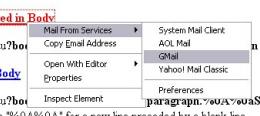
A right-click and the selection of the Mail From Services entry displays the currently available webmail services that can be picked. It is possible to remove any unnecessary services in the options of the add-on.
Users need an account at Mozilla.org to download and install the add-on because it is currently in the sandbox.
Microsoft Windows Malicious Software Removal Tool
A new version of the Microsoft Windows Malicious Software Removal Tool has been released as well yesterday. The new version is able to remove infections by specific prevalent malicious software. It´s able to detect 64 infections, that´s three more than the previous version. The three new infections that are detected are Locksky, Reatlle and Valla according to the german newsmag pcwelt.de.
The Microsoft Windows Malicious Software Removal Tool checks Windows XP, Windows 2000, and Windows Server 2003 computers for and helps remove infections by specific, prevalent malicious software—including Blaster, Sasser, and Mydoom. When the detection and removal process is complete, the tool displays a report describing the outcome, including which, if any, malicious software was detected and removed. The tool creates a log file named mrt.log in the %WINDIR%\debug folder.
The Microsoft Windows Malicious Software Removal Tool checks Windows XP, Windows 2000, and Windows Server 2003 computers for and helps remove infections by specific, prevalent malicious software—including Blaster, Sasser, and Mydoom. When the detection and removal process is complete, the tool displays a report describing the outcome, including which, if any, malicious software was detected and removed. The tool creates a log file named mrt.log in the %WINDIR%\debug folder.
Thursday, July 24, 2008
Software piracy hurts the open-source community too
Proprietary software vendors, movie companies and the music industry aren't the only businesses that don't like pirates stealing, copying and reselling their CDs and DVDs.
It turns out that pirated software can also hurt the open-source community. When stolen proprietary software is used by consumers, that's a lost opportunity for open-source software makers to get their own software onto the computer hard drives of new users.
So says Louis Suarez-Potts, the community manager at Sun Microsystems Inc. for the OpenOffice.org open-source project, who discussed the phenomenon here at the 10th annual O'Reilly Open Source Convention.
"Piracy hurts open source because open source asks people to help give back and contribute code, but they say, 'Why should I help? I have Microsoft Office for free,'" Suarez-Potts said.
Around the world, he said, many national governments are realizing that this hurts them, too, because their citizens are then consumers of stolen technology rather than active participants in open-source communities that can help people gain technology skills that benefit workforces and nations.
By cracking down on software piracy, nations around the globe are starting to see that they can help themselves dramatically by encouraging innovation and creativity -- as well as job growth and richer economies -- through open-source development, he said.
"China wants to create workers who can do this and create and sustain wealth," rather than just sell pirated software that doesn't improve the lives of the country's people, Suarez-Potts said. "We will all benefit if they are creating interesting things."
إطلاق زيبازي برنامج الذكاء الاصطناعي لاستخلاص البيانات
بعد أربع سنوات من البحث والتطوير، توصلت أخيراً شركة زيبازي للحوسبة (ZeBAze Computing) إلى إطلاق النسخة الأولى من برنامج زيبازي (ZeBAze)، الجيل الجديد لمحرّك بحث يحولّ بفعالية طريقة استخلاص واسترجاع المعلومات من قاعدة البيانات.
ويظهر زيبازي المزوّد بتقنيات الذكاء الاصطناعي ووظائف تنقيب البيانات، قدرات شبيهة بعمليات التفكير الإنساني عبر استخدام المرونة خلال عملية البحث وإراحة المستخدمين من الصلابة المألوفة لاستخلاص البيانات.
ويمكن للمستخدمين استهداف القيمة التي يشاءون لعدة حقول للأرقام والتواريخ واختيار مقياس القيم لأي من هذه الحقول. ويسترجع زيبازي صفوف البيانات الأقرب إلى الاختيارات المحددة مستخدماً فهماً مرناً وإجمالياً لمعايير البحث ليصنفها وفقاً لذلك.
وتشمل وظيفة زيبازي أيضاً التحليل المعمّق للنص والأرقام والتواريخ بواسطة التعابير المنتظمة ويوفر كل معايير البحث الكلاسيكية التي يمكن توقعها من محرّك البحث.
ويتميز زيبازي بسهولة استخدامه وبتكيّفه الآلي مع أي بنية قاعدة بيانات بواسطة واجهات ملائمة لها جميعاً، مع إمكانية إظهار نتائج البحث على الشاشة أو مكتوبة في قاعدة بيانات يمكن استخدامها مجدداً مع برنامج زيبازي أو أي تطبيقات أخرى.
ويعمل زيبازي مع نظام تشغيل ويندوز ويمكن وصله تقريباً بأي قاعدة بيانات أو جداول أوراق العمل أو ملف نصّ مركّب من دون الحاجة لأي تعديل مسبق.
وتبلغ كلفة النسخة الواحدة المرخصة من زيبازي 99 دولاراً أميركياً وتتوفر النسخ المجانية مع بعض القيود للاستخدام الشخصي وغير المهني. وتتوفّر معلومات إضافية عن البرنامج على موقعه الإلكتروني www.zebaze.com، كما يمكن تنزيل نسخة كاملة تجريبية منه صالحة للاستخدام لمدة 30 يوماً
ويظهر زيبازي المزوّد بتقنيات الذكاء الاصطناعي ووظائف تنقيب البيانات، قدرات شبيهة بعمليات التفكير الإنساني عبر استخدام المرونة خلال عملية البحث وإراحة المستخدمين من الصلابة المألوفة لاستخلاص البيانات.
ويمكن للمستخدمين استهداف القيمة التي يشاءون لعدة حقول للأرقام والتواريخ واختيار مقياس القيم لأي من هذه الحقول. ويسترجع زيبازي صفوف البيانات الأقرب إلى الاختيارات المحددة مستخدماً فهماً مرناً وإجمالياً لمعايير البحث ليصنفها وفقاً لذلك.
وتشمل وظيفة زيبازي أيضاً التحليل المعمّق للنص والأرقام والتواريخ بواسطة التعابير المنتظمة ويوفر كل معايير البحث الكلاسيكية التي يمكن توقعها من محرّك البحث.
ويتميز زيبازي بسهولة استخدامه وبتكيّفه الآلي مع أي بنية قاعدة بيانات بواسطة واجهات ملائمة لها جميعاً، مع إمكانية إظهار نتائج البحث على الشاشة أو مكتوبة في قاعدة بيانات يمكن استخدامها مجدداً مع برنامج زيبازي أو أي تطبيقات أخرى.
ويعمل زيبازي مع نظام تشغيل ويندوز ويمكن وصله تقريباً بأي قاعدة بيانات أو جداول أوراق العمل أو ملف نصّ مركّب من دون الحاجة لأي تعديل مسبق.
وتبلغ كلفة النسخة الواحدة المرخصة من زيبازي 99 دولاراً أميركياً وتتوفر النسخ المجانية مع بعض القيود للاستخدام الشخصي وغير المهني. وتتوفّر معلومات إضافية عن البرنامج على موقعه الإلكتروني www.zebaze.com، كما يمكن تنزيل نسخة كاملة تجريبية منه صالحة للاستخدام لمدة 30 يوماً
بعد 40 عاماً من الخدمة في السلك الكمبيوتري أيام "الماوس" معدودة.. والبديل على الطريق

أيام الماوس أو "فأرة الكمبيوتر" باتت معدودة، هذا باختصار ما يؤول إليه التقرير الصادر عن "غارتنر" اليوم، والذي تتوقع فيه مؤسسة الأبحاث الشهيرة بأن تشهد السنوات القليلة القادمة تقاعد أكثر ملحقات الكمبيوتر تعلّقاً بالمستخدم، وذلك بعد حوالي 40 سنة قضتها في الخدمة.
ويوضح التقرير بأن ثمة أكثر من بديل يتوق للعب هذا الدور الجوهري الذي يمثل حلقة التواصل الرئيسية بين المستخدم والكمبيوتر. وتتمحور الخيارات البديلة حول ما يعرف بـ "الآليات الإيمائية للتحكم بالكمبيوتر Gestural Computer Mechanisms"، مثل شاشات التحكم باللمس وأجهزة التعرف على تعابير الوجه.
ويرى التقرير أن الماوس تفي بالغرض فقط عندما يتعلق الموضوع ببيئة العمل وأجهزة الكمبيوتر المكتبية، ولكنها لن تكون أبداً الخيار الأمثل للترفية المنزلي والحوسبة المحمولة بشتى تطبيقاتها.
وتستند الدراسة في توقعاتها إلى الجهود الكبيرة التي تبذلها شركات الإلكترونيات بصفة عامة في سبيل تطوير منتجات ذات واجهات استخدام تفاعلية مستلهمة من عالم الألعاب الإلكترونية الحديثة التي باتت تحظى بشعبية وانتشار واسعين على مستوى العالم.
ويورد التقرير أمثلة كثيرة يدعم بها استنتاجه، ومنها قيام شركتي "سوني" و"كانون" بتطوير وتطبيق تقنيات التعرف على تعابير الوجه والتجاوب معها في الزمن الحقيقي. ويشير كذلك إلى أنظمة التفاعل العاطفي Emotive Systems التي تتيح للمستخدم التحكم بالكمبيوتر عن طريق التفكير فحسب! ومن المتوقع أن تشهد الأسواق ظهور هذا النوع من الأنظمة في سبتمبر/أيلول القادم.
ومن الطبيعي أن يثير مثل هذا التقرير جدلاً كبيراً في أوساط صناعة وتوزيع ملحقات الكمبيوتر، إذ لا يتفق الكثير من العاملين في هذا المجال مع ما يذهب إليه هذا التقرير الذي يقولون إنه لا يخلو من المبالغة؛ وفي المقابل فإنهم لا يرون في الأفق أية نهاية وشيكة للماوس.
Google opens doors to Knol
July 23, 2008 (Computerworld) Seven months after Google Inc. announced plans to launch its own Wikipedia-type project, authors on Wednesday were invited to submit content to the new site, called Knol (which means a unit of knowledge).
Though the concept is quite similar to that used by Wikipedia, Google said it is not looking to compete harshly with the established site. The company said it is focusing on highlighting the authors who submit articles to the site. Each knol will have a single author or group of authors whose name or names will appear with their contributions, Google noted in a blog post.
"The Web contains vast amounts of information, but not everything worth knowing is on the Web," Google said. "An enormous amount of information resides in people's heads: Millions of people know useful things, and billions more could benefit from that knowledge. Knol will encourage these people to contribute their knowledge online and make it accessible to everyone."
Knol will include a new concept that Google is calling "moderated collaboration," where any reader can make suggested edits to a knol, which the author can choose to accept, reject or modify for inclusion on the site, Google said.
Knol also includes various community tools to allow users to submit comments, ratings or write reviews. Mashable blogger Adam Ostrow wrote that because Knol allows authors to insert AdSense ads on their knols and earn money based on clicks, "this sounds a lot less like the community collaborating on authoritative articles (Wikipedia) and a lot more like a potential land grab to create content for keywords."
However, he acknowledged that offering the ability for anyone to comment or review an article raises or lowers the authority of that article and should keep "would-be opportunists" at bay.
"In giving a single author control over each knol and its edits, it's hard to imagine the service will be as authoritative as Wikipedia, which many would argue has its own biases," Ostrow added. "Meanwhile, Knol could still be a huge traffic generator for Google and steal visitors from Wikipedia if it's integrated in search results -- something Google has not been shy about doing with other properties like YouTube."
Danny Sullivan, a blogger at Search Engine Land, noted that the best way to describe Knol is Wikipedia with moderation. "The collaborative advantage to Wikipedia is also its disadvantage," Sullivan noted. "Since anyone can contribute, some introduce factual errors or overtly vandalize articles. It's one reason that Wikipedia is considering moderation."
However, Sullivan added that he is concerned that hosting Knol content will set up inherent conflicts that will start to erode the trust users have in Google.
"By hosting this content, it plays too much in the content-owner space when its core business is supposed to be driving traffic outbound to others," Sullivan noted. "I can see the value in Knol's tool set and the potential it might offer to help collect further knowledge. So I'll give Knol the benefit of the doubt -- that it will perhaps occupy a space not being filled, rather than push others aside."
Wednesday, July 23, 2008
Google is doing WHAT?
Facial recognition search
Image search is a burgeoning market that is woefully untapped. Today, when you type "Paris Hilton" at Google.com, you'll find images that other users have tagged. Yet tagging is a tedious process. At Flickr.com, for example, many images are left untagged, making it impossible to find them by searching. The more images stored without tags, the harder it is to find them.
At Google, new facial recognition technology will make it easier to find untagged images. Unlike the technology used for biometrics -- where you can pass through a security checkpoint when a video camera confirms your identity -- this image search is purely for finding the information you want.
"What Google did for text, we want to do for vision," says Shumeet Baluja, a Google research scientist. "We want to make images just as searchable and accessible as text."
Imagine this scenario: Five years from now, when all of your digital photos are stored online, you decide you want to search for pictures of your grandmother. With Google facial recognition technology, you might start with a source scan that measures the distance between the eyes, arrangement of nose, ears, eyes and other data. In seconds, you find every image you ever uploaded -- and any image stored anywhere online.

After measuring the facial characteristics of an image, you can find all versions of that image, including the most common photo and all variations.
Click to view larger image.
Click to view larger image.
Download Windows Live Tools for Visual Studio 2008
To download it, head on over to the Windows Live Dev Connect page on Microsoft Connect, go to the download page and download it.
Check out this awesome Article on Live Tools for VS 2008
http://www.liveside.net/blogs/developer/archive/2007/11/07/download-windows-live-tools-for-visual-studio-2008.aspx
Face Recognition "THE UNIQUENESS OF GOD CREATION VERSUS THE ART OF COMPUTER"
يوم العلوم في جامعة بيروت العربية
تميز يوم العلوم الذي اقيم في جامعة بيروت العربية امس بالمشاريع التي قدمها طلاب الكلية بحضور رئيس الجامعة الدكتور مصطفى حسن وعدد من الشخصيات العلمية والاجتماعية المعروفة.
وقد برز الطالبان محمد فرحات وحسين ياسين بمشروعهما الذي لاقى اعجابا واستحسانا كبيرا من الحضور، لما فيه من افكار جديدة حيث حمل عنوان
«THE UNIQUENESS OF GOD CREATION VERSUS THE ART OF
COMPUTER» ويتضمن فكرة « FACE RECOGNITION» تمييز صورة الوجه من خلال برنامج بالاضافة الى عدة مشاريع متعلقة بعالم الكومبيوتر والبرمجة وعالم الكيمياء والفيزياء.
 خلال قص الشريط
جريدة الديار بتاريخ الاحد 15 ايار 2005
تميز يوم العلوم الذي اقيم في جامعة بيروت العربية امس بالمشاريع التي قدمها طلاب الكلية بحضور رئيس الجامعة الدكتور مصطفى حسن وعدد من الشخصيات العلمية والاجتماعية المعروفة.
وقد برز الطالبان محمد فرحات وحسين ياسين بمشروعهما الذي لاقى اعجابا واستحسانا كبيرا من الحضور، لما فيه من افكار جديدة حيث حمل عنوان
«THE UNIQUENESS OF GOD CREATION VERSUS THE ART OF
COMPUTER» ويتضمن فكرة « FACE RECOGNITION» تمييز صورة الوجه من خلال برنامج بالاضافة الى عدة مشاريع متعلقة بعالم الكومبيوتر والبرمجة وعالم الكيمياء والفيزياء.
 خلال قص الشريط
جريدة الديار بتاريخ الاحد 15 ايار 2005
BAU science fair
Won science fair project 2006 for "Smart Card" project, and published by "Assafir" Lebanese newspaper.


Subscribe to:
Posts (Atom)
